 Skip to content
A weak battery rarely gives much warning. One morning, your engine cranks slowly, the headlights seem dim, and lifting the hood reveals a crusty white buildup covering the battery terminals. That small amount of corrosion can interrupt electrical flow, reduce starting power, and eventually leave you stranded when you least expect it. Certainly, every driver would be curious about how to repair auto battery corrosion by themselves in an easy way.
Consequently, throughout my more than 20 years as an ASE-certified automotive technician, I’ve seen countless batteries replaced before their time simply because corrosion was ignored. My goal is to give you practical, experience-based advice you can trust, just as we strive to do every day at AHS Rankers.
In this guide, I’ll explain the best way to clean battery terminal corrosion safely, why it develops, and when cleaning is enough versus when replacement becomes the smarter option. Let’s dive into the details.
How Do You Repair Auto Battery Corrosion?
To repair auto battery corrosion, disconnect the battery safely, remove corrosion with a baking soda and water solution, scrub the terminals using a wire brush, dry every connection thoroughly, and reconnect the battery correctly. If corrosion has severely damaged the terminals, cables, or battery case, replacing those components is the safest and most reliable solution.
What Causes Auto Battery Corrosion?

Battery corrosion rarely appears without a reason. Before grabbing a brush or wrench, it helps to understand why the buildup forms in the first place. From my experience in the shop, identifying the cause is just as important as cleaning the terminals because it helps prevent the same problem from returning a few months later.
Common Reasons Battery Corrosion Forms
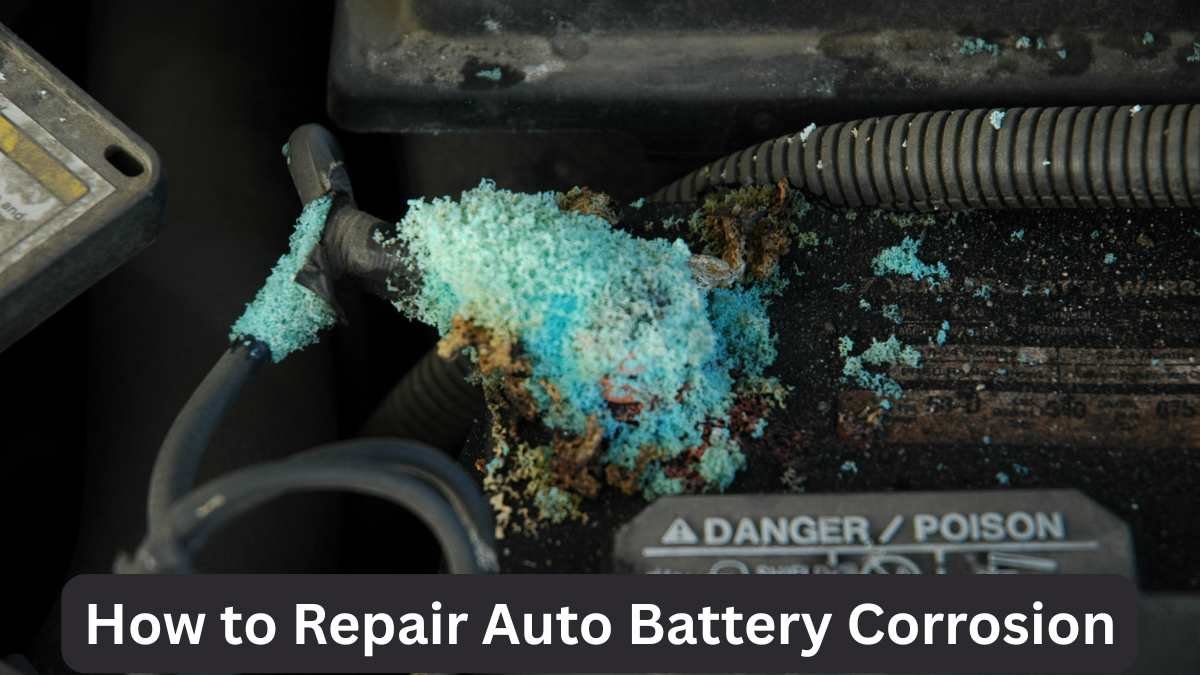
Most drivers assume battery corrosion means the battery has failed, but that isn’t always true. In many cases, corrosion develops because tiny amounts of hydrogen gas escape through the battery vents during normal charging. Once that gas mixes with moisture and outside air, it creates the white, bluish, or green deposits commonly found around the terminals.
Battery age also plays a major role. As batteries get older, the seals weaken and become more likely to release acidic vapors. I’ve also seen excessive corrosion caused by an overcharging alternator, loose battery connections, and extreme temperature swings.
Moreover, what this really means for drivers is that cleaning the terminals solves only part of the problem if the charging system or the battery itself is beginning to fail.
Signs Your Battery Needs Immediate Attention
Corrosion usually gives several warning signs before it creates a complete no-start condition. Paying attention to those early symptoms can save both time and money.
The most obvious sign is a powdery white, blue, or green substance around the battery terminals. Beyond that, you may notice the engine cranking more slowly than usual, especially on cold mornings. Dim headlights, flickering interior lights, and occasional electrical glitches can also point toward poor battery connections caused by corrosion.
From my experience in the shop, drivers often ignore these symptoms because the vehicle eventually starts after a second attempt. Unfortunately, corrosion continues to restrict electrical flow each time the vehicle is driven. That added resistance forces the starter and charging system to work harder, shortening the life of several electrical components.
How to Repair Auto Battery Corrosion Safely

Cleaning battery corrosion isn’t difficult, but doing it carelessly can create unnecessary safety risks. Battery acid is corrosive, and the electrical system deserves respect. Let’s break it down into the same process I follow when inspecting customer vehicles in my own shop.
Gather the Right Safety Equipment
Before touching the battery, prepare the work area and collect everything you’ll need. A few simple tools make the job easier while reducing the chance of injury.
I recommend wearing protective gloves and safety glasses whenever working around automotive batteries. Keep a wire brush, an old toothbrush, baking soda, clean water, a small container, paper towels, and a wrench nearby. Battery terminal cleaning brushes work particularly well because they’re designed to clean both the inside and outside of the connectors.
I’ve seen people attempt this repair with household metal tools that damage the battery terminals. Choosing the proper equipment protects both the battery and your hands. Taking five extra minutes to prepare often prevents expensive mistakes later.
Disconnect the Battery Correctly
One of the biggest mistakes I encounter is disconnecting the battery in the wrong order. That simple error can create sparks or even damage sensitive electronics.
Always loosen and remove the negative (-) battery cable first. This disconnects the electrical ground and greatly reduces the risk of accidental short circuits. Once the negative cable is safely out of the way, remove the positive cable.
Keep metal tools from touching both terminals simultaneously. It sounds obvious, but I’ve watched experienced DIY mechanics accidentally bridge the terminals with a wrench. Fortunately, most learn that lesson only once. Careful battery removal creates a much safer environment before cleaning begins.
Neutralize and Clean Battery Corrosion
Now comes the part most people picture when they think about battery maintenance. Fortunately, the cleaning process is straightforward when performed correctly.
Mix approximately one tablespoon of baking soda into a cup of warm water. Carefully pour or apply the solution onto the corroded areas. You’ll notice bubbling almost immediately as the baking soda neutralizes the acidic deposits.
Use a battery terminal brush or stiff toothbrush to scrub away the loosened corrosion. Stubborn buildup may require several passes before the metal becomes clean and shiny again. Avoid excessive force because battery terminals can become weaker with age. From my experience in the shop, patience produces far better results than aggressive scrubbing.
Dry and Inspect Every Connection
Cleaning alone doesn’t finish the job. Inspection often reveals problems hidden beneath the corrosion.
Dry every terminal completely with a clean towel or compressed air. Moisture trapped around the connectors can encourage new corrosion to develop sooner than expected.
Next, inspect both battery terminals and cable ends closely. Look for cracked connectors, broken strands inside the cables, excessive pitting, or loose clamps. I frequently find corrosion hiding inside the cable insulation where drivers cannot see it. When that happens, replacing the affected cable is usually the safest long-term repair instead of cleaning alone.
Reconnect the Battery Properly
With the terminals clean and dry, it’s time to reconnect the battery. This step seems simple, yet I’ve corrected plenty of vehicles that continued having starting issues because the cables weren’t reinstalled properly. A clean connection won’t do much if it’s loose or installed in the wrong order.
Reconnect the positive (+) terminal first, making sure it sits fully on the battery post before tightening the clamp. Follow with the negative (-) terminal, tightening it just enough to prevent movement. Avoid over-tightening because excessive force can crack the battery post or distort the terminal clamp.
After both cables are secure, gently try to move each connection by hand. There should be no noticeable movement. From my experience in the shop, a solid electrical connection is every bit as important as removing the corrosion itself. A few extra seconds spent checking your work can prevent frustrating starting problems later.
Test Battery Performance After Cleaning
Cleaning the corrosion is only part of the repair. The next step is confirming that the battery and charging system are actually performing the way they should. Corrosion sometimes hides a battery that’s already nearing the end of its service life.
Start the engine and pay attention to how quickly it cranks. A healthy battery should turn the engine over confidently without hesitation. Check the dashboard to make sure the battery warning light goes out shortly after the engine starts. Turn on the headlights and blower motor to verify the electrical system operates normally without dimming or flickering.
If you own a digital multimeter, measure the charging voltage with the engine running. Most vehicles should read between 13.7 and 14.7 volts. Readings outside that range may point to a charging system issue rather than a battery problem. What this really means for drivers is that cleaning corrosion restores the connection, but testing confirms whether the entire system is healthy.
When Cleaning Isn’t Enough
Cleaning battery terminals works well in many situations, but it isn’t a cure for every battery problem. Some signs indicate the damage goes beyond surface corrosion. Recognizing those warning signs early helps prevent repeated breakdowns and unnecessary repairs.
Replace Damaged Battery Terminals
Not every battery terminal can be saved with a wire brush. Heavy corrosion gradually eats away at the metal until the connection becomes weak or unstable. I’ve seen terminals that looked clean on the outside but were badly damaged underneath after the corrosion was removed.
Inspect the clamps carefully after cleaning. If you notice deep pitting, broken sections, stretched clamps, or terminals that no longer tighten securely, replacement is the safest solution. Damaged terminals create excessive electrical resistance that can overheat cables and reduce starter performance.
Battery terminal replacement is relatively inexpensive compared to replacing a starter motor or alternator damaged by poor electrical connections. From my experience in the shop, replacing severely worn terminals often solves recurring starting complaints that simple cleaning never could.
Test the Battery and Charging System
Battery corrosion sometimes points toward a larger electrical issue. That’s why I never consider a repair complete without checking both the battery and the charging system. It only takes a few minutes and provides valuable information about the vehicle’s overall health.
A battery load test measures how well the battery performs under real starting conditions. Even if it shows a normal voltage while sitting still, it may fail once a heavy electrical load is applied. The alternator should also be tested to verify it charges the battery correctly without overcharging or undercharging.
I’ve encountered plenty of vehicles where repeated corrosion was caused by a faulty voltage regulator rather than the battery itself. Finding the real cause prevents the same problem from returning after every cleaning.
When to Visit an ASE-Certified Mechanic
Many battery corrosion repairs are well within the abilities of careful DIY vehicle owners. Still, some situations deserve professional attention because guessing can become expensive.
If corrosion returns within a few weeks, the battery leaks fluid, the case appears swollen, or electrical problems continue after cleaning, schedule a proper inspection. These symptoms often indicate internal battery failure or charging system faults that require specialized testing equipment.
As an ASE-certified technician, I’ve learned that recurring corrosion is usually a symptom rather than the root problem. A professional inspection can identify failing battery cables, damaged grounds, alternator issues, or parasitic electrical drains before they leave you stranded. Investing in accurate diagnosis often costs less than replacing parts based on trial and error.
Prevent Auto Battery Corrosion in the Future

The best battery repair is the one you never have to make again. Preventive maintenance takes very little time, yet it dramatically reduces the chances of corrosion returning. Small habits performed throughout the year can add years to a battery’s useful life.
Perform Regular Battery Inspections
Most drivers don’t look under the hood until something goes wrong. I recommend checking your battery at least once a month, especially before long road trips or seasonal weather changes.
Look for early signs of white or bluish deposits, loose cable connections, cracked insulation, or moisture around the battery case. Catching corrosion while it’s still minor makes cleaning much easier and prevents damage to the terminals.
Routine inspections also allow you to verify that the battery remains securely mounted. Excessive vibration shortens battery life and can loosen cable connections over time. From my experience in the shop, five minutes of preventive maintenance each month often prevents inconvenient roadside breakdowns.
Apply Anti-Corrosion Protection
Cleaning the battery removes existing corrosion, but protecting the terminals helps slow future buildup. Several inexpensive products are designed specifically for this purpose.
A light coating of dielectric grease on the battery terminals helps seal out moisture while maintaining good electrical contact. Many technicians also install anti-corrosion felt washers, which fit around the battery posts and absorb small amounts of acid before it reaches the terminals. Battery terminal protectant sprays provide another effective barrier against moisture and corrosive vapors.
These products aren’t expensive, but they can make a noticeable difference over the life of the battery. I use them regularly because they reduce repeat corrosion and help keep electrical connections clean between routine maintenance visits.
Maintain a Healthy Charging System
Battery health depends on far more than the battery itself. The alternator, voltage regulator, and electrical connections all work together to keep the charging system operating efficiently.
Schedule a battery and charging system inspection during routine maintenance, particularly if your battery is more than three years old. Ask your mechanic to verify charging voltage, inspect battery cables, and check the condition of the ground connections. These simple inspections often identify developing problems long before warning lights appear.
What this really means for drivers is that preventing corrosion isn’t just about cleaning terminals. A healthy charging system reduces stress on the battery, extends component life, and improves overall vehicle reliability.
Simple Battery Maintenance Checklist
Following these habits can greatly reduce the chance of future corrosion:
- Inspect battery terminals every month.
- Clean minor corrosion before it spreads.
- Keep battery cables tight and secure.
- Test the battery at least once a year.
- Check charging voltage during routine service.
- Apply dielectric grease or terminal protectant after cleaning.
- Replace aging batteries before they fail unexpectedly.
- Make sure the battery is securely fastened in its tray.
Common Mistakes to Avoid
Over the years, I’ve seen the same errors repeated in countless garages. Avoiding them makes battery maintenance safer and more effective.
- Disconnect the positive cable first.
- Cleaning corrosion without wearing eye and hand protection.
- Leaving moisture around the battery terminals.
- Ignoring corrosion that keeps returning.
- Over-tightening battery terminal clamps.
- Reusing badly corroded battery cables instead of replacing them.
- Assuming every starting problem is caused by the battery.
Final Thoughts
Well, now you would have learned that how to removing corrosion from battery terminal in a safe way at home. Therefore, battery corrosion may look alarming, but in many cases it’s a manageable maintenance issue when handled correctly and early.
Thus, understanding why corrosion forms, cleaning the terminals safely, and checking the overall charging system can restore dependable starting performance while extending battery life.
Equally important is knowing when corrosion signals a larger problem that requires professional diagnosis rather than another quick cleaning. Above all, at AHS Rankers, my goal is to provide practical, expert-backed automotive advice based on real repair experience, not paid recommendations or promotional claims.
Every guide is written to help drivers make informed decisions with confidence, transparency, and the same honest approach I have followed throughout more than two decades in the automotive repair industry.




Add your first comment to this post